Manage Subscription
The My Subscription page is where you see your plan, card and usage, change plan, update the card, buy add-ons and cancel. The owner, and admins with access to all agents, can change things; other team members see the page read-only.
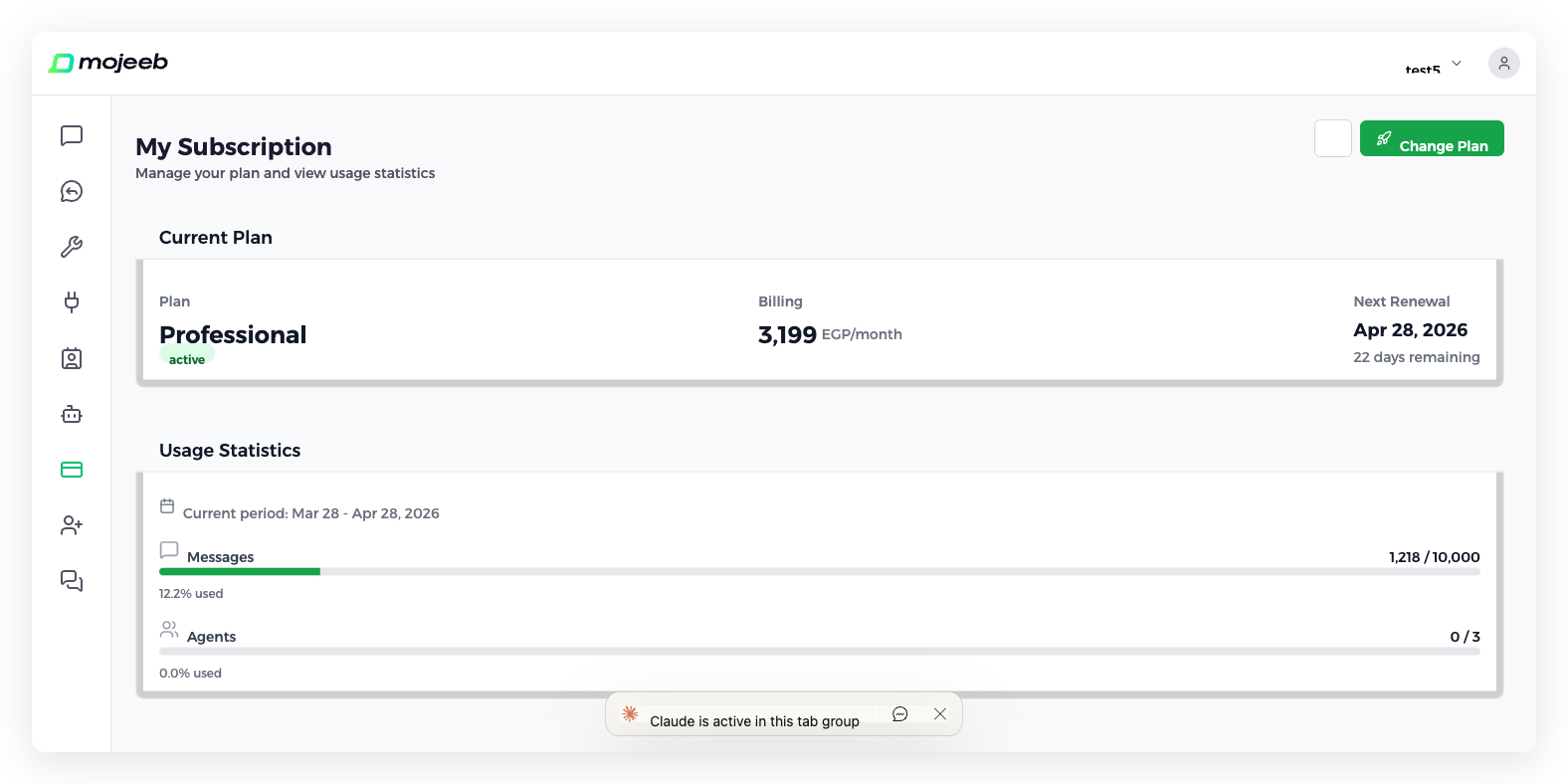
What does the subscription page show?
Three sections, plus a Change Plan button in the header, which reads Upgrade Plan on the free plan and Subscribe after a cancellation, and a gear icon (⚙) with Change Card and Cancel Subscription.
- Current Plan — The plan name with its status badge, active, Ending soon, past_due or canceled; Billing, either Free or the amount per month in your currency; the card on file with an Update Card pencil; and Next Renewal with the days remaining, which becomes Ends on once a cancellation is scheduled.
- Usage Statistics — A Messages bar with used and limit and the percentage used, an Agents bar, the Current period dates, and View History, which opens Usage History with every billing period's limits and usage. From about 80% of the messages, a notice suggests upgrading. A large knowledge base shows a second notice, because each reply then counts as more than one message; see Knowledge Base.
- Add-ons — Message packs and agent slots for the current period; see Add-Ons.
Who can change the subscription?
The owner, and any admin whose access is set to All agents. Members, and admins limited to specific agents, can open the page but see no Change Plan button, gear menu, card or add-ons. See Team Management.
How do I upgrade my plan?
- Click Change Plan. Change Your Plan lists the Free, Starter and Professional plans, billed monthly.
- Click Upgrade on the plan you want. The Confirm Upgrade step shows the plan, Your new limits will take effect immediately, a Next billing date, which is your old renewal date, and Have a coupon? with Apply. Once you pay, renewal moves to one month from today.
- Click Next to pay on Stripe's checkout page with a card.
- Stripe returns you to Payment Successful!; the new limits apply within seconds.
Upgrading starts a new billing cycle today at the new plan's full price; the remaining days of the old plan are not credited, and messages already used this period stay counted. Capacity from add-ons bought this period is replaced by the new plan's limits, so buy add-ons after changing plan.
How do I downgrade my plan?
Click Change Plan, then Downgrade on the lower plan and Confirm Downgrade. Your limits drop to the new plan's at once and the renewal date stays the same, but the amount charged at the next renewal is settled by support, so contact support after a mid-period downgrade. To stop paying altogether, use the gear icon (⚙) and Cancel Subscription rather than downgrading to Free. Currency and billing-interval changes also go through support.
How do I update my card?
Click the gear icon (⚙) and choose Change Card, or the pencil next to the card under Current Plan. Stripe's secure page opens to enter the new card and returns you to Mojeeb. Cards are never stored by Mojeeb. There is no invoice list in the dashboard; contact support for invoices.
How do I cancel my subscription?
Click the gear icon (⚙) and choose Cancel Subscription. The window offers two options:
- Cancel at period end, the default: the subscription stays active until the renewal date, then does not renew.
- Cancel immediately: the subscription ends now and access to paid features is removed.
Click Confirm. After a cancellation at period end, the plan shows Ending soon, Next Renewal becomes Ends on, a banner confirms that nothing more will be charged, and a confirmation email is sent. There is no self-service undo, so contact support before the date to keep the plan. After the end, the account continues on the free plan.
What happens if a payment fails?
The plan's status becomes past_due, and owners and admins receive a WhatsApp notice from Mojeeb. The agent keeps working while Stripe retries the card over about two weeks; update the card from the gear menu to settle it. If the payment never succeeds, the subscription is canceled and the account drops to the free plan.
Common questions
Can I pay monthly or yearly?
The dashboard bills monthly. Contact support for annual billing.
Are upgrades prorated?
No. An upgrade starts a new billing cycle today at the full price of the new plan, and the unused days of the old plan are not refunded or credited.
Can I pay by cash or bank transfer?
Manual subscriptions are set up by the Mojeeb team; contact support. They are renewed and canceled through support too, not from the dashboard, and the page shows no card for them.
Can I change my currency?
No. The currency, USD, EGP or SAR, is set when the subscription starts. Contact support to change it.
My store is on Shopify. Where do I manage the plan?
In Shopify. The page shows Billed through Shopify and Manage or cancel in Shopify, and add-ons are not offered.